This is default featured slide 1 title

Go to Blogger edit html and find these sentences.Now replace these sentences with your own descriptions.This theme is Bloggerized by Lasantha Bandara - Premiumbloggertemplates.com.

This is default featured slide 2 title

Go to Blogger edit html and find these sentences.Now replace these sentences with your own descriptions.This theme is Bloggerized by Lasantha Bandara - Premiumbloggertemplates.com.

This is default featured slide 3 title

Go to Blogger edit html and find these sentences.Now replace these sentences with your own descriptions.This theme is Bloggerized by Lasantha Bandara - Premiumbloggertemplates.com.

This is default featured slide 4 title

Go to Blogger edit html and find these sentences.Now replace these sentences with your own descriptions.This theme is Bloggerized by Lasantha Bandara - Premiumbloggertemplates.com.

This is default featured slide 5 title

Go to Blogger edit html and find these sentences.Now replace these sentences with your own descriptions.This theme is Bloggerized by Lasantha Bandara - Premiumbloggertemplates.com.

Showing posts with label DRIVER(မ်ား). Show all posts

Tuesday, May 13, 2014

DriverPack Solution 2013 Full Version (x86&64 bit)


 DriverPack Solution ကို သိၾကျပီးျဖစ္မွာပါ... မိမိတို႔ ကြန္ပ်ဴတာမွာ အေၾကာင္းအမ်ိဳးမ်ိဳးေၾကာင့္ Driver ေပ်ာက္တာမ်ိဳး ၊ လိုေနတာမ်ိဳးေတြကို  Run ေပးလိုက္တာနဲ႔ ၅ မိနစ္ဆိုတဲ့ အခ်ိန္အတြင္း ေအာ္တို ဆြဲတင္ေပးသြားမွာပါ.. ဖိုင္လ္ဆိုက္ဒ္ကေတာ့ နည္းနည္းၾကီးပါတယ္ 4.4GB ပါ... ေအာက္မွာ အဆင္ေျပစြာ ေဒါင္းယူႏိုင္ပါတယ္..။

Automatic installation of drivers:

Install the DriverPack Solution on almost any computer for only about 5 minutes.
Saving of time
After downloading the Driver Pack Solution once no longer need to spend time searching for drivers.
Windows XP / Vista / 7 (x86-x64)
Supports all modern operating systems!
As a 32-and 64-bit version
Ease of use
Simple and intuitive interface.
Any driver for any computer
All the drivers on a single DVD-ROM
Simplify downloading new drivers from the Internet.
Ability to update drivers
Update the existing driver to more recent versions.
The program is suitable for all models of computers.
That includes free drivers for laptops: Asus, Acer, Sony, Samsung, HP, Lenovo, Toshiba, Fujitsu-Siemens, DELL, eMachines, MSI .

It will help download free drivers for:

motherboard, sound card (audio), Video Card, Network Card, Wi-Fi, chipset, controller, Bluetooth (Bluetooth), Modem, Web-camera, card reader, CPU, input devices, monitor, Printer, scanner, USB, Other .
Download drivers free from the manufacturers: Ati (Radeon), Nvidia (GeForce), Realtek, Intel, Amd, Atheros, Via.

System requirements:

The program is suitable for all models of computers.
Windows XP / Vista / 7 (x86-x64)
Supports all modern operating systems!
As a 32-and 64-bit version!
Download DriverPack Solution 13 Requirements:
Any PC (desktop/laptop/netbook)
Windows 8 / 7 / Vista / XP (x32-x64)
Size: 4,4Gb

(or)

Direct Download Links

Download Part 1 

Download Part 2

Download Part 3

 Download Part 4

 Download Part 5


www.winkabarkyaw.net
အဆင္ေျပရင္ fb ေလး LIKE ေလးေပးခဲ့ပါေနာ္.......
 

DriverEasy Professional v4.6.3.3060 + Crack


Driver Easy Professional ေနာက္ဆံုးထြက္ Version ေလးတင္ေပးလိုက္ပါဗ်ာ။ Facebook Chat Box မွေတာင္း ထားတဲ့ ညီငယ္လည္းေဒါင္းယူႏိုင္ပါျပီ။ ကြန္ျပဴတာတစ္လံုးမွာ အေရးၾကီးဆံုးကေတာ့ Driver လိုေျပာလို႕ရ ပါတယ္ဗ်ာ။ ဒါေၾကာင့္ မိမိကြန္ျပဴတာမွာရွိတဲ့ Hardware ေတြရဲ႕ Driver ေတြအတြက္ေဒါင္းယူထားပါ။ လိုအပ္ တဲ့ Driver ေတြကို ရွာေဖြေပးျပီး Auto Installation လုပ္ေပးမွာျဖစ္ပါတယ္။ လိုအပ္တာေတြကို ရွာေဖြဖို႕အ အတြက္ အင္တာနက္ကြန္နရွင္ အသင့္အတင့္ရွိထားဖို႕လိုအပ္ပါတယ္ဗ်ာ။ Windows XP, Vista,  7, 8 (both 32-bit & 64-bit) အားလံုးမွာအသံုးျပဳႏိုင္ပါတယ္ဗ်ာ။ အျမဲတမ္းအသံုးျပဳႏို္င္ေအာင္ Full Version အျဖစ္ Crack File ကိုပါထည့္သြင္းေပးထားပါတယ္။ Crack Folder ကို Copy ကူးျပီး C\Program File\DriverEasy Pro ထဲကို Paste လုပ္ေပးလိုက္ရင္ Full Version ျဖစ္ပါျပီ။ ဒီထက္ပိုျပီးအေသးစိတ္သိခ်င္ရင္ေတာ့ ေအာက္မွာရွင္းျပေပး ထားပါတယ္ဗ်ာ။

Features
  • Uninstall Removed Hardware Driver: When you replace the graphic card, do you know Windows still keep your old one driver, and will launch it each time, when Windows start up. This will case the system slowing boot up, and may case some system conflict. Driver Easy allow you uninstall the removed hardware, to clean up your system.
  • Your One-Stop Driver Solution: Driver Easy is design for quickly and easy to identify unknown device's drivers, and keep your driver in latest version. Much more, we have implement driver backup, driver restore, and driver uninstall feature, to ensure your driver secure and safe.
  • Smart "Auto-Installation": This smart feature is our Industry first technology! It enable user to install the driver automatically, even help you extract, analyze & install it. What you need to do is to click your mouse once or twice.
  • Download Windows Update more faster: Start from Driver Easy 4.0, we have add a new Windows Update tools, with the smart download server picker, and 2 ~ 5 concurrency download, let you download and install windows update faster than ever.
  • Keep Existing Driver Up-to-Date: With our daily update driver database, your system will improve the performance, fix the blue screen problem, add more enhance feature by install the latest drivers.
  • Backup & Restore Drivers: Do not worry about it if you lost the driver disc, Driver Easy can backup the driver your current installed, you can restore it after system reload. This is an benefit feature if you not sure are the new driver compatible your system or not, you can backup existing driver, and roll-back it later.
  • Uninstall Removed Hardware Driver: When you replace the graphic card, do you know Windows still keep your old one driver, and will launch it each time, when Windows start up. This will case the system slowing boot up, and may case some system conflict. Driver Easy allow you uninstall the removed hardware, to clean up your system.
System Requirement
  • Windows XP, Vista,  7, 8 (both 32-bit & 64-bit) 
  • Pentium III or higher
  • 128 MB of available RAM 
  • 25 MB of free Hard Disk space 
  • Internet Connection to Download Driver 
  • .NET Framework 2.0
https://blogger.googleusercontent.com/img/b/R29vZ2xl/AVvXsEjn3dvmxICcJeNub-rEvpuxKwVu_crGq38PWcNhYG6yHcnqBT0jl0wMFfzK6bez98aU-FlLsMHqVb1-O7sX9MqyfGiRo0kOHkdLWgWPwW02GX2r5XQy53unA-iWfkjDg7LX_uC99VAdD1E/s1600/2.jpg 


 **  Step-1.ေအာက္က Download Button ကိုႏွိပ္လိုက္ပါ  
**  Step-2. "5sec". ေလာက္ေစာင္႕ေပးပါ။

**  Step-3. "  << SKIP AD >>   ".ကိုႏွိပ္ေပးပါ။
**  Step-4. Download Link က်လာပါလိမ္႕မယ္။
**  အဆင္ေျပပါေစဗ်ာ။


အဆင္ေျပရင္ fb ေလး LIKE ေလးေပးခဲ့ပါေနာ္.......

DriverPack Solution 14 R411+14.03.3 (New Update,28 March2014)

DriverPack ကို သိတဲ့လူမ်ား သိၾကမွာပါ... ကြန္ပ်ဴတာမွာ လိုအပ္ေနတဲ့ Driver ေတြကို အလိုေလွ်ာက္ ထည့္သြင္းေပးႏိုင္တဲ႔ Software ပါ.... မေန႔ကမွ Update ေလးထြက္လာလို႔ တဆင့္ျပန္လည္မွ်ေဝေပးလိုက္ပါတယ္...။

The all-new shell DRP 14 automatically select and install the correct driver for your computer. This version has many new features and optimized for the new operating system Windows 8.1. Compared with the previous version of the DRP 14in this version is much fixed shell and completely new driver packs. Installing the driver is in a shell just a few clicks, and this process can be fully automated. Thanks freshest driver-pakam, the program will install drivers on virtually any computer of any age. Install and update the drivers of this program is not connected to the Internet directly from the HDD / flash / DVD.

Some Key Features
- Works with any driver packages (files 7z, zip), for any operating system since Windows XP
Work as a 32 bit and a 64 bit
Ability to group and custom installation of drivers
Ability to handle files in batches finish Bashrat'a
Transparent application settings (all settings are changed through the settings). All settings are stored in an ini-file
Quickly create a database of drivers (the ability to create all databases with one click)
Friendly and responsive interface
View the list of devices for the local PC
View oxidase drivers for the driver package
Ability to work with any carrier
Ability to add and run from the interface additional tools (to add, use the menu-options - additional tools). Ie, to some extent can be used as a autorun for your collections
Check for program updates via the Internet
Ability to silent install
Multilingual interface.

Credit : http://www.bunganajwa.com
ဝင္းကမာၻေက်ာ္
www.winkabarkyaw.net

<<<<<.......... အဆင္ေျပရင္ Facebook Like ေလးနဲ႔အားေပးခဲ့ပါေနာ္  ..........>>>>>>>  

DriverEasy Professional v4.6.7.15798 + Patch

http://www.fullprogramlar.org/uploads/posts/2014-04/1396643813_1393412.jpg
Driver Easy Professional ေနာက္ဆံုးထြက္ Version ေလးတင္ေပးလိုက္ပါဗ်ာ။ ကြန္ျပဴတာတစ္လံုးမွာအေရး ၾကီးဆံုးကေတာ့ Driver လိုေျပာလို႕ရ ပါတယ္ဗ်ာ။ ဒါေၾကာင့္ မိမိကြန္ျပဴတာမွာရွိတဲ့ Hardware ေတြရဲ႕ Driver အတြက္ေဒါင္းယူထားပါ။ လိုအပ္ တဲ့ Driver ေတြကို ရွာေဖြေပးျပီး Auto Installation လုပ္ေပးမွာျဖစ္ပါတယ္။ လိုအပ္တာေတြကို ရွာေဖြဖို႕အ အတြက္ အင္တာနက္ကြန္နရွင္ အသင့္အတင့္ရွိထားဖို႕လိုအပ္ပါတယ္ဗ်ာ။ Windows XP, Vista,  7, 8 (both 32-bit & 64-bit) အားလံုးမွာအသံုးျပဳႏိုင္ပါတယ္ဗ်ာ။ အျမဲတမ္း အသံုးျပဳႏို္င္ေအာင္ Full Version အျဖစ္ Crack File ကိုပါထည့္သြင္းေပးထားပါတယ္။ Crack Folder ကို Copy ကူးျပီး C\Program File\DriverEasy Pro ထဲကို Paste လုပ္ေပးလိုက္ရင္ Full Version ျဖစ္ပါျပီ။ ဒီထက္ပိုျပီးအေသးစိတ္သိခ်င္ရင္ေတာ့ ေအာက္မွာရွင္းျပေပး ထားပါတယ္ဗ်ာ။


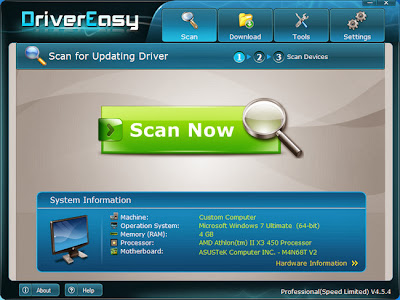
DriverEasy is an application that you can use to locate missing drivers and download them on your computer. Once you initiate the program with the user-friendly interface, you can view system information that focuses on the machine, operating system, RAM, processors and motherboard. But you can also view data about hardware, such as video cards, monitors, hard disk, network card and audio card.
So, all you have to do is initiate the scanning process and DriverEasy will start locating your missing drivers (e.g. keyboards, mice and other pointing devices, sound, video and game controllers, human interface devices, display adapters).
Your One-Stop Driver Solution:
· Driver Easy is design for quickly and easy to identify unknown device’s drivers, and keep your driver in latest version. Much more, we have implement driver backup, driver restore, and driver uninstall feature, to ensure your driver secure and safe.
Detect Unknown Device Driver:
· Driver Easy has a huge online database, which include over 100,000,000 hardware device’s driver, with it revolutionary driver detect engine, it help you download the unknown device driver, help you fix the driver issue.
Keep Existing Driver Up-to-Date:
· With our daily update driver database, your system will improve the performance, fix the blue screen problem, add more enhance feature by install the latest drivers.
Backup & Restore Drivers:
· Do not worry about it if you lost the driver disc, Driver Easy can backup the driver your current installed, you can restore it after system reload. This is an benefit feature if you not sure are the new driver compatible your system or not, you can backup existing driver, and roll-back it later.
Uninstall Removed Hardware Driver:
· When you replace the graphic card, do you know Windows still keep your old one driver, and will launch it each time, when Windows start up. This will case the system slowing boot up, and may case some system conflict. Driver Easy allow you uninstall the removed hardware, to clean up your system.

**  Step-1.ေအာက္က Download Button ကိုႏွိပ္လိုက္ပါ  
**  Step-2. "5sec". ေလာက္ေစာင္႕ေပးပါ။

**  Step-3. "  << SKIP AD >>   ".ကိုႏွိပ္ေပးပါ။
**  Step-4. Download Link က်လာပါလိမ္႕မယ္။
**  အဆင္ေျပပါေစဗ်ာ။

  
<<<<<.......... အဆင္ေျပရင္ Facebook Like ေလးနဲ႔အားေပးခဲ့ပါေနာ္  ..........>>>>>>> 
 

SamDrivers FULL Edition 14.4 & DVD Edition 14.2.2 (x86/x64)


  Driver အတြက္ အခတ္အခဲျဖစ္ေနရင္ ဒါေလးက ကူညီေျဖရွင္းေပးႏိုင္ပါတယ္... Update Version ပါ.. ေအာက္မွာ ေဒါင္းယူႏိုင္ပါတယ္..။
Collection of drivers from SamLab.ws for all 32- bit and 64- bit Windows operating systems from Windows 2000 to Windows 8.1 Update 1 , including server platforms .
 
As the shell-installer to auto-detect your hardware and automatically install the necessary drivers use special programs :

DriverPack Solution 14.4 Revision 412 / Drivers Installer Assistant 5.12.30 / Snappy Driver Installer 0.1.44 / DriverX 3.05 + wrapper for the backup drivers Drivers Backup Solution 3.90.21


  Thank to : BungaNajwa.Com


 How to Download:


www.winkabarkyaw.net


      <<<<<.......... အဆင္ေျပရင္ Facebook Like ေလးနဲ႔အားေပးခဲ့ပါေနာ္ 
..........>>>>>>>

Windows 7 Drivers (Eng/x86/x64) (Update 1.04.2014)


Window 7 နဲ႔ Window XP  ေတြအတြက္ Driver ေတြပါ.... မိမိတို႔စက္မွာ လိုအပ္ေနတဲ႔ Driver ေတြကို Auto ဆြဲသြင္းေပးသြာမွာပါ...။
File Size ကေတာ့ 5.5GB ပါ...။
About the program: Collection of updated drivers for devices running the operating system Windows XP / 7 x32/x64, represents the most complete and fresh set on 01/04/2014. This release contains the drivers for stationary (Desktop) Computer and Notebook for (Notebook). All drivers are sorted by devices and packaged in self-extracting archives 7-zip. All drivers were downloaded from the official websites of manufacturers (Intel, AMD, Nvidia, Realtek, VIA, etc.) and are the reference (without third-party changes).

ပါဝင္တဲ႔ Driver ေတြကေတာ့ ေအာက္မွာ ေလ့လာႏိုင္ပါတယ္...။

List of Windows 7 drivers:

Audio
* Analog Devices SoundMAX HD Audio Windows 7 Driver analog-device hd v.6.10.1.6620 -- x32/x64
* IDT HD Audio Driver v.6.10.6495.0 -- x32/x64
* Realtek HD Audio Driver R2.73 v.6.0.1.7195 WHQL -- x32/x64
* Realtek AC97 Audio Driver PG537 — x32/x64
* Realtek HDMI Audio Driver R2.70 -- x32/x64
* C-Media CM-102 Driver v.6.12.8.2131 -- x32/x64
* C-Media CM106 v.2131-2111 — x32/x64
* C-Media CM6501 v.6.12.8.2151 — x32/x64
* C-Media CM8738 v.7.12.8.1742 — x32/x64
* C-Media CM8768 v.8.17.41— x32/x64
* C-Media CM8770 v.8.17.42 — x32/x64
* C-Media CM8787 v.8.18.03 — x32/x64
* C-Media CM8788 v.8.18.03 — x32/x64
* Conexant Hermosa HD Audio Windows 7 Driver v.4.98.9.0 — x32/x64
* Conexant Cocoa II HD Audio Vista7 Driver v.4.121.0.50 -- x32/x64
* Conexant Pebble HD Audio Vista7 Driver v.4.111.0.60 -- x32/x64
* Conexant HD Audio Driver v.8.64.59.59 -- x32/x64
* VIA HD Audio Driver v.6.0.11.0300— x32/x64
* SigmaTel HD Audio v.6.10.6207.2 -- x32/x64

Video
* AMD/ATI Catalyst 13.12 Desktop WHQL x32
* AMD/ATI Catalyst 13.12 Desktop WHQL x64
* AMD/ATI Catalyst 13.12 Mobility WHQL x32
* AMD/ATI Catalyst 13.12 Mobility WHQL x64
* AMD/ATI Catalyst 13.9 Desktop WHQL for 2x,3x,4x series -- x32
* AMD/ATI Catalyst 13.9 Desktop WHQL for 2x,3x,4x series -- x64
* Intel Graphics Driver
(945G,945GZ,946GZ,G965,Q965,Q963,G33,G35,Q33,Q35,G31,945GC,
945GM,945GME,945GMS,940GML,GM965,GME965,GLE960) – v.15.12.75.1825 - x32/x64
* Intel Graphics Driver (B43,G41,G43,G45,Q43,Q45,GL40,GM45,GS45,GS40) - v.15.17.12 -- x32/x64
* Intel HD Graphics v.15.22.58 -- x32/x64
* Intel HD Graphics 2000/3000/4000 v.15.28.21 -- x32/x64
* Intel HD Graphics 3000 drivers v.9.17.10.3347 -- x32/x64
* Intel HD Graphics 3600 v.8.14.8.1096 -- x32
* Intel HD Graphics 4000 (3rd & 4th generation) v.9.18.10.3006 -- x32/x64
* Intel HD Graphics 5000 (3rd & 4th generation) v.10.18.10.3282 -- x32/x64
* Intel HD Graphics 5200 v.10.18.10.3496 WHQL -- x32/x64
* Intel Broadwell HD Graphics v.10.18.10.3380 -- x32/x64
* Intel GMA 500 v.5.0.0.2030 -- x32
* Intel GMA 600 v.8.14.6.3077 -- x32
* Intel GMA 900 v.15.31.17.3257 -- x32
* Intel GMA 900 v.15.31.17.64.3257 -- x64
* Intel GMA 950,965 v.15.12.75.4.1930 -- x32
* Intel GMA 950,965 v.15.12.75.4.64.1930 -- x64
* Intel GMA 3150 v.15.12.75.50.7.2230 -- x32
* Intel GMA 3150 v.15.12.75.50.64.2230 -- x64
* Intel GMA 3600 v.8.14.8.1096 -- x32
* Nvidia 335.23 Desktop WHQL -- x32
* Nvidia 335.23 Desktop WHQL -- x64
* Nvidia 335.23 Notebook WHQL -- x32
* Nvidia 335.23 Notebook WHQL -- x64
* Nvidia 307.83 Desktop WHQL for 6x-7x-series -- x32
* Nvidia 307.83 Desktop WHQL for 6x-7x-series -- x64
* VIA CN896 VIA Chrome9™, P4M900 VIA Chrome9™, VN896 VIA Chrome9™ HC v.24.10.04i — x32/x64
* VIA VX800 VIA Chrome9™ HC, VX820/UT VIA Chrome9™ HC v.24.10.04k — x32/x64
* VIA VX855 VIA Chrome9™ HCM, VX875 VIA Chrome9™ HCM v.24.10.04j — x32/x64
* SiS Video Driver UniVGA v.5.29 -- x32/x64

Chipset
* Intel Chipset Driver v.9.4.0.1027 & v.10.0.13 WHQL -- x32/x64
* Intel AMT/MEI/HECI Driver v.7.00.02.1164 -- x32/x64
* Intel Management Engine Interface Driver v.9.6.0.1038 -- x32/x64
* NVIDIA nForce Windows 7 Driver v.15.58 x32
* NVIDIA nForce Windows 7 Driver v.15.58 x64
* VIA Hyperion Chipset Driver 5.24a — x32/x64
LAN (Сеть)
* Atheros (AR8121/AR8113/AR8114/AR8131/AR8132) v.1.0.0.49 — x32/x64
* Atheros (AR813x/AR815x) v.2.1.0.21 — x32/x64
* Atheros (L1 Gigabit Ethernet 10/100/1000 Base-T Controller) v.2.4.7.29 — x32/x64
* Broadcom Ethernet Driver v.16.2.4.1 — x32/x64
* Intel PRO/10/1000 (PRO/10GbE) Ethernet Driver v.19.0 -— x32/x64
* JMicron 2xx Ethernet Driver v.6.0.31.6 — x32/x64
* Marvell Yukon Gigabit Ethernet Driver v.12.10.14.3 -- x32/x64
* Realtek Ethernet Windows 7 Driver v.7.080.0218.2014 -- x32/x64
* VIA Rhine Ethernet Driver/win7 v1.15.01 -- x32/x64
* VIA Velocity Ethernet Driver v.1.41 -- x32/x64

Card Reader
* Alcor Micro Card Reader Driver v.1.0.39.0 — x32/x64
* Broadcom Card Reader Driver v.16.0.2.8 - x32/x64
* JMicron JMB38x Driver v.1.00.76.01 WHQL — x32/x64
* O2Micro Memory Stick Reader Driver (OZ6933,OZ711E0,OZ711EC1,OZ711E1,OZ711E2,OZ711M1,OZ711M2,OZ711M3) - v.3.19.1 — x32/x64
* Realtek ( RTS 5121, 5101, 5111, 5116 Card Reader) v.6.1.7600.30127 — x32/x64
* Realtek ( RTS 5158 Card Reader) v.6.0.6000.20136 -- x32/x64
* Realtek ( RTS 5139 Card Reader) v.6.3.9600.39057 -- x32/x64
* Realtek ( RTS 5229 Card Reader) v.6.3.9600.29077 -- x32/x64
* Realtek ( RTS 5227, 5249 Card Reader) v.6.3.9600.21249 -- x32/x64
* Realtek ( RTS 5208, 5209 Card Reader) v.6.3.9600.28150 -- x32/x64
* Realtek ( RTS 528x Card Reader) v.6.2.9200.27040 -- x32/x64
* Ricoh R5C83x/84x Driver v.2.14.00.05 — x32/x64
* Ricoh R5U23x/24x Driver v.2.25.17.01 -- x32/x64

Wi-Fi
* Atheros AR50XX Wireless Windows 7 Driver v.10.0.0.75 — x32/x64
* Atheros AR6XXX Wireless Windows 7 Driver v.3.1.2.78 -- x32/x64
* Atheros AR9XXX Wireless Windows 7 Driver v.10.0.0.279 -- x32/x64
* Broadcom Wireless Windows 7 Driver v.6.30.223.215 -- x32/x64
* Intel Wi-Fi Windows 7 Driver v.16.10.0.5 -- x32/x64
* Ralink Wi-Fi Windows 7 Driver v.5.0.44.0 -- x32/x64
* Realtek RTL8187S, RTL8191SE Wireless LAN v.6.9110 — x32/x64
* Realtek RTL8180, RTL8185 Wireless LAN -- v.6.1122.1016.2009 -- x32/x64
* Realtek RTL8187B Wireless LAN v.62.1182.1163 — x32/x64
* Realtek RTL8187L Wireless LAN v.6.1316 — x32/x64
* Realtek RTL8190, RTL8192E Wireless LAN v.2002.1.0106 -- x32/x64
* Realtek RTL8191SE, RTL8192SE Wireless LAN v.2021.0.0203.2012 -- x32/x64
* Realtek RTL8192U Windows 7 Driver v.6.1372 -- x32/x64
* Realtek RTL8192CE, RTL8192CE, RTL8188CE Driver v.2012.9.0212.2014 -- x32/x64
* Realtek RTL8188CU, RTL8192CU Driver v.1026.4.1023.2013 -- x32/x64
* Realtek RTL8188CE, RTL8723AE Wireless LAN v.2002.5.0806.2012 -- X32/X64

Modems
* Driver Zyxel p-630s ee for win 7 x32
* Driver Zyxel p-630s ee for win 7 x64
* Driver DSL-200 for win7 x32/x64
* Driver ADSL-модем Acorp Sprinter USB for win 7 x32

USB 3.0 Host Controller
* ASMedia USB3.0 v.11.6.4.0 -- x32/x64
* Etron USB3.0 v.1.0.0.119 -- x32/x64
* Fresco Logic USB3.0 v.3.5.97.0 -- x32/x64
* Intel USB3.0 v.3.0.0.19 -- x32/x64
* Renesas USB3.0 Host v.3.0.23.0 -- x32/64
* Renesas(NEC) USB3.0 Host v.2.1.36.0 -- x32/64
* Texas Instruments USB 3.0 Controller drivers v.1.16.4.0 WHQL -- x32/x64
* VIA USB3.0 v.4.40C&D WHQL

Name : Windows 7 Drivers Update 01.04.2014
Version : April 2014
Languange : English/Russ
Medicine : Include
OS Support : Xp/7 (x86/x64)
Type File : Rar
Code File : w7.drivrs.aprl2014
Password : bunganajwa.com
Updated : 1 April 2014
Publisher : Intel, AMD, Nvidia, Realtek, VIA
Size : 5.5 Gb
 Thank to : http://www.bunganajwa.com
(or)
www.winkabarkyaw.net

            <<<<<.......... အဆင္ေျပရင္ Facebook Like ေလးနဲ႔အားေပးခဲ့ပါေနာ္ ..........>>>>>>>